It’s been a while (apparently 7.5 years) since I’ve written something about home theater here. To be honest, not a lot has changed in my setup. I’ve moved from having satellite TV and watching (buying) lots of DVDs to primarily streaming content – Netflix or Amazon Prime. We still enjoy the occasional Blu-ray, but the quality of streaming is good enough and the convenience factor is high. I think there is also a social aspect to keeping up with what your friends are watching as well.
There are many many options out there for seating. We’ve had two rows of couches from the start, but while couches are comfortable if you want to stretch out you either end up with some sort of foot stool – or you’re lying sideways. Honestly couches are a great solution, but they don’t have that fancy feel to them. Recliners are fancy. Many (all?) of the movie theaters today in our area have fairly nice recliners now.
This got us looking at recliners. Ideally we’d go for Canadian made, but after searching around buying local drives the price up to double or more (and the quality). The couch we had in the front row was really showing it’s age and needed replacing. Specifications I was looking for: leather with power reclining, Jenn also wanted to make sure they looked ok because quite honestly many options are fairly ugly.
With leather there is a lot of variation. You want to avoid any of the gel or bonded leather, these tend to be in the very low end of the market and simply won’t last or feel all that great long term. Sadly, leather appears to be completely unregulated and ‘top grain’ leather has a huge range as well. The other gotcha here is that the selection is nearly 100% online (at least in the price range we were looking at).
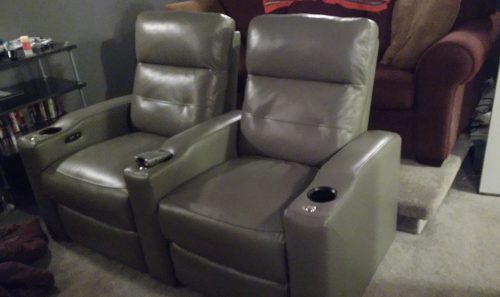
This is what we ended up getting:
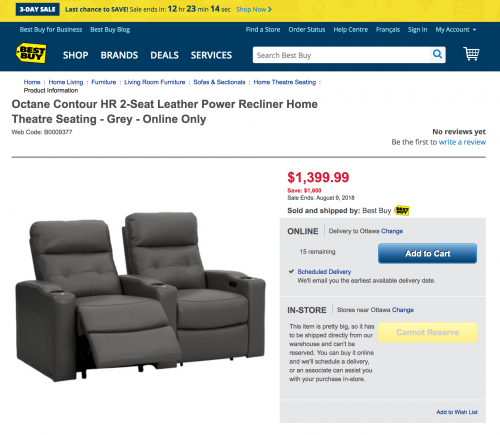
BestBuy had a fairly good sale on, and they seemed to have real leather. When you go digging there are not very many reviews of these, and the result vary quite a bit. You can find Octane Seating – the company that makes these (in China). If you dig around, you find out that Octane allows for orders with custom fabric, and they have quite a range of grades they support as well. I think this explains why there is such a variety of reviews for products that are described similarly.
I think we bought a day before the sale ended. While I was waiting for the delivery, I couldn’t help but check the website – and I wasn’t very surprised to see this.

Ok, so the 3 day sale didn’t really end after 3 days, it was extended. Maybe they are trying to drain stock or something.

Yeah, at this point it’s starting to get a little bit silly. It’s the sale that goes on forever. I was wrong, on the 17th it returned to normal full price.

But… other models were now on sale. It seems there is always a sale for entertainment furniture, in fact – while I was writing the post they were back on sale for the same discount.
We’ve had them a few weeks and have really enjoyed them. Going for the power recliner was absolutely the right choice, it was worth the price increase for that. The Octane Contour HR have motorized headrests which I would recommend, as a feature it seems like a gimmick, but it is really useful (and comfortable).
The leather is not as nice as the love seat we bought a couple of years ago for basically twice the price. That said, the product that we received felt like it was worth the sale price. I wouldn’t pay the full price for these, or at least not what BestBuy is asking as full price. While these exact chairs may not be on sale, there seems to always be some of the models on sale. I’d also consider CostCo as another source.
The motors are audible, but quiet enough that it’s not too intrusive if you adjust while watching. I’m basically 6′ tall, and I fit but I suspect a taller person may not be as comfortable.
Oddities. The two seat pair, ships in 4 parts. Both back rests come off (and are easy for 2 people to put back on). You get 1 full chair (two arms) and 1 with a single arm. You simply place them together on the floor – and the weight keeps them in place. I expecting there to be some sort of locking / connection mechanism but no, it’s just placement.
Overall very happy with the purchase, already thinking about converting the 2nd row of seating to recliners too.
Pros:
- Power recline and power headrest
- Much more comfortable than the worn out couch they replaced
- Fancy looking, premium seating at home
Cons:
- Seats are not physically attached
- Kids play with the controls
- Leather quality is ‘ok’ and may vary from vendor to vendor
Footnote: We initially tried to buy a set of seats that EastPorters carries, but was sold / shipped by Staples. The ordering process seemed to go off the rails, so a week later we assumed they had just cancelled the order. Weeks later, a shipping company calls to arrange drop off of our assumed cancelled order. They ended up leaving seats on the front step with no signature. They did come get the unwanted delivery and we eventually got a 100% refund, but only after chasing them a bit. I wouldn’t recommend Staples for this type of purchase